Sunday, December 20, 2009

Centering a container on screen with JavaScript (jQuery plugin)

Recently I needed a way to center an image on screen for a 'Coming Soon' kind of page, and so I wrote this jQuery plugin that does in fact this.

You can download the normal, unpacked version for development or the packed version for production.

Click here to view a demo

The container needs to have a preset width and height for this to work


Here is the unpacked code:

/*
 * CenterScreen v1.1 - jQuery plugin
 * 
 *  Copyright (c) 2009 - 2010 Andreas Grech
 *
 *  Dual licensed under the MIT and GPL licenses:
 *    http://www.opensource.org/licenses/mit-license.php
 *    http://www.gnu.org/licenses/gpl.html
 *
 * http://blog.dreasgrech.com
 */

(function ($) {
    $.fn.centerScreen = function () {
        return this.each(function () {
            var $this = $(this),
                $window = $(window),
                center = function () {
                    var winWidth = $window.width(),
                        winHeight = $window.height();
                    $this.css({
                        position: 'absolute',
                        left: ((winWidth / 2) - ($this.outerWidth() / 2)),
                        top: ((winHeight / 2) - ($this.outerHeight() / 2))
                    });
                };
            $window.resize(center);
            center();
        });
    };
}(jQuery));

Saturday, December 19, 2009

Lexical Scoping in JavaScript

Take a look at the below code:

var f = function () {
    var n = 42;
    return function () {
        return n;
    };
}();

var result = f();
alert(result);

The function f is a self-invoking function that returns a function, that returns the variable n declared in the outer function.

The alert of the above code is, as you'd expect, 42

Now let's try rewriting the above code so that instead of returning a function that is declared internally, it now returns a function that was defined outside (but that does the same thing):

var f2 = function () {
    return n;
};

var f = function () {
    var n = 42;
    return f2;
}(); 

var result = f();
alert(result);

This should return the same result, no?

Actually, we are greeted with the following error:


n is not defined


This is because of JavaScript's static scoping, also known as lexical scoping, because matching a variable to its binding only requires analysis of the program text.

This means that the scope of the variable is determined at compile-time, and from the second code snippet we can see that during compile time variable n of function f2 has window (window.n) as it's scope; and since n doesn't exist in the global scope, it is undefined.


JavaScript's Function Scope

Those developers who are coming from a C background may find JavaScript's scoping rules a bit confusing.

Let's take a look at the following C code:

#include <stdio.h>

int main () {
    int n = 5;
    if (1) {
        int n = 2;
    }
    printf("n is %d", n);
}

The output of the above code is:

n is 5


Now let us implement the above code in JavaScript:

var scoping = function () {
    var n = 5;
    if (1) {  
        var n = 2;
    }
    alert('n is ' + n);
};

What do you think the above code alerts?

If you answered n is 5, then you are wrong


This is because, unlike C, JavaScript only supports Function Scope and not Block Scope.

What this means is that JavaScript creates a new scope only with a function:

var scoping = function () {
    var n = 5;
    var x = function () {  
        var n = 2;
    };
    alert('n is ' + n);
};

Now, n is 5 is alerted because a new scope has been created with the inner function and thus it's encapsulating the inner variable n.


Saturday, December 5, 2009

Updating your Twitter Status from C#

Today I needed a way to update my Twitter Status via C#, and for that I found this library: Yedda Twitter C# Library.

After I added a reference to the Yedda.Twitter.dll, I tried working with the following code:

namespace TestingAPIs
{
    using Yedda;

    class Program
    {
        static void Main(string[] args)
        {
            var t = new Twitter();
            t.Update(
                "myUsername",                          // Username
                "myPassword",                          // Password
                "From Visual Studio",                  // New Status
                Yedda.Twitter.OutputFormatType.JSON);  // Output Type
        }
    }
}

Simple eh?

Well, much to my amazement, that threw an exception -_- ...obviously, it wouldn't as much fun if it worked on the first try eh!

So, after some googling, I found some posts that detailed the problem:

This error is seemingly because Twitter servers have started rejecting Expect HTTP header with value "100-Continue".


So anyways, to fix this problem we need to modify a method from the Twitter.cs file of the Yedda library.

Open up the file and find the following method: ExecutePostCommand

At the start of the method, add the following line of code:

System.Net.ServicePointManager.Expect100Continue = false;

That will fix the above problem.

Here is the complete modified method:

protected string ExecutePostCommand(string url, string userName, string password, string data) {
 System.Net.ServicePointManager.Expect100Continue = false;
 WebRequest request = WebRequest.Create(url);
 if (!string.IsNullOrEmpty(userName) && !string.IsNullOrEmpty(password)) {
  request.Credentials = new NetworkCredential(userName, password);
  request.ContentType = "application/x-www-form-urlencoded";
  request.Method = "POST";

  if (!string.IsNullOrEmpty(TwitterClient)) {
   request.Headers.Add("X-Twitter-Client", TwitterClient);
  }

  if (!string.IsNullOrEmpty(TwitterClientVersion)) {
   request.Headers.Add("X-Twitter-Version", TwitterClientVersion);
  }

  if (!string.IsNullOrEmpty(TwitterClientUrl)) {
   request.Headers.Add("X-Twitter-URL", TwitterClientUrl);
  }


  if (!string.IsNullOrEmpty(Source)) {
   data += "&source=" + HttpUtility.UrlEncode(Source);
  }

  byte[] bytes = Encoding.UTF8.GetBytes(data);

  request.ContentLength = bytes.Length;
  using (Stream requestStream = request.GetRequestStream()) {
   requestStream.Write(bytes, 0, bytes.Length);

   using (WebResponse response = request.GetResponse()) {
    using (StreamReader reader = new StreamReader(response.GetResponseStream())) {
     return reader.ReadToEnd();
    }
   }
  }
 }

 return null;
}


Sunday, November 29, 2009

Detecting Firebug with JavaScript

Need to implement some debugging methods for your library with Firebug's console as your Output Window?

Here's a quick way to check if Firebug is enabled:

if (window.console && window.console.firebug) {
    //Firebug is enabled
}

Obviously, this is not a fool-proof method because anyone can overwrite the console object, but I think that it's the best you're gonna get.


Thursday, November 26, 2009

Custom-sorting arrays in JavaScript

To sort an array in JavaScript, we use the array.sort() method.

Let's take a look at the following code:

var words   = ["andreas", "john", "grech", "janica", "buhagiar"];
var numbers = [5, 2, 8, 666, 42, 13];

console.log(words.sort());
console.log(numbers.sort());

The results of the above are:

["andreas", "buhagiar", "grech", "janica", "john"]

[13, 2, 42, 5, 666, 8]

As you can see, the strings are sorted correctly, but what happened to the numbers? 13 is obviously greater than 2, so why is it before?

Sorting lexicographically

The problem with the array.sort function is that it sorts lexicographically, meaning it sorts 'alphabetically'; in dictionary order; and thus the sort function just assumes that the elements that need to be sorted are strings. And if they aren't strings, it converts them to strings and then compares them.

Fortunately, sort takes also a single parameter; a function that will be used to sort the array with.

Let's take an example of how we can sort numbers:

var numbers = [5, 2, 8, 666, 42, 13];
var ascNumSort = function (a, b) {
    return a - b;
};
var ns = numbers.sort(ascNumSort);
console.log(ns);

Now we created a function called ascNumSort and passed it to the sort method, and as you can see the numbers are now correctly sorted in ascending order.

What kind of function ?

The function that you pass as a parameter to the sort method needs to abide with the following rules:
  1. It must accept two formal arguments
  2. Return a 0 if the two elements are equal
  3. Return a positive number if the second parameter should come before the first parameter
  4. Return a negative number if the first parameter should come before the second parameter
With these rules, we can now build our custom sorting functions.

Let's say that we have an array of objects representing people and we want to sort these people according to their height, in descending order:

var people = [
    {name: "Andreas", height: 5.4},
    {name: "Janica",  height: 4.3},
    {name: "Cameron", height: 5.8},
    {name: "Richard", height: 5.4},
    {name: "Ryan",    height: 4.5}
];

var sortedPeople = people.sort(function (p1, p2) {
    return p2.height - p1.height;
});

console.log(sortedPeople);
/*Result:
[
 Object name=Cameron height=5.8, 
 Object name=Andreas height=5.4, 
 Object name=Richard height=5.4, 
 Object name=Ryan    height=4.5, 
 Object name=Janica  height=4.3
]
*/

Sorting on multiple keys

By implementing what we did above, but in a more general way, we can come up with a function that will allow us to sort an array of objects, given a key (or multiple keys) [taken from Douglas Crockford's The Good Parts]:

//Function by takes a member name string and an
//optional minor comparison function and returns
//a comparison function that can be used to sort an
//array of objects that contain that member.  The
//minor comparison function is used to break ties
//when the o[name] and p[name] are equal 

var by = function (name, minor) {
    return function (o, p) {
        var a, b;
        if (typeof o === 'object' && typeof p === 'object' && o && p) {
            a = o[name];
            b = p[name];
            if (a === b) {
                return typeof minor === 'function' ? minor(o, p) : o;
            }
            if (typeof a === typeof b) {
                return a < b ? -1 : 1;
            }
            return typeof a < typeof b ? -1 : 1;
        } else {
            throw {
                name: 'Error',
                message: 'Expected an object when sorting by ' + name
            };
        }
    }
};      

Now let's take a look of an example of how we can use the above by function:

var people = [
    {name: "Andreas", height: 5.4},
    {name: "Janica",  height: 4.3},
    {name: "Tony",    height: 5.8},
    {name: "Richard", height: 5.4},
    {name: "Ryan",    height: 4.5},
    {name: "Cameron", height: 5.8}
];

console.log(people.sort(by('height')));
/*Result:
[
 Object name=Janica height=4.3,  Object name=Ryan height=4.5, 
 Object name=Andreas height=5.4, Object name=Richard height=5.4, 
 Object name=Tony height=5.8,    Object name=Cameron height=5.8
]
*/

console.log(people.sort(by('height', by('name'))));
/*Result:
[
 Object name=Janica height=4.3,  Object name=Ryan height=4.5, 
 Object name=Andreas height=5.4, Object name=Richard height=5.4, 
 Object name=Cameron height=5.8, Object name=Tony height=5.8
]
*/


Check if your CPU is either 32-bit of 64-bit in Windows Vista

Today or tomorrow I will be upgrading from my current Vista to Windows 7 and I needed to check which version of the OS the install.

To check whether my CPU was 32-bit or 64-bit, here's what I did (in Vista):

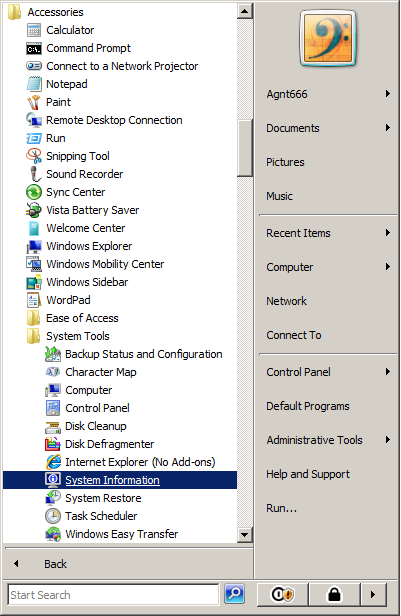
 First open up the System Information tools from Accessories > System Tools


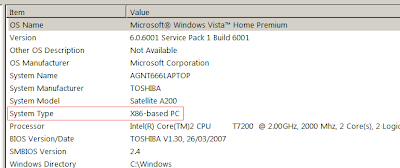
Then from the System Information, look for the System Type Row, and there you will have your answer:


  • x86-based PC: 32-Bit Computer
  • x64-based PC: 64-Bit Computer