Thursday, September 8, 2011

The Monty Hall game

After my last post on simulating the Monty Hall problem, I decided to go a step further and actually write the game itself. Since I wrote the simulation using JavaScript, I kept at it by writing the game using JavaScript by making use of the canvas element.

You can play the game here and find the source on Github: https://github.com/dreasgrech/The-Monty-Hall-Game.

The code leaves much to be desired but since this was a quick weekend project (...although some tweaks did spill over to the rest of the week), I didn't worry too much about it.

Screenshots


Saturday, September 3, 2011

Simulating the Monty Hall problem

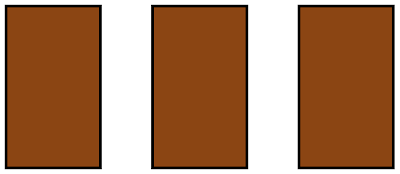
You're on a game show and begin the game by having three doors in front of you. Behind one of the doors, lies the prize. You don't know which door is the winning door but the game show host knows.


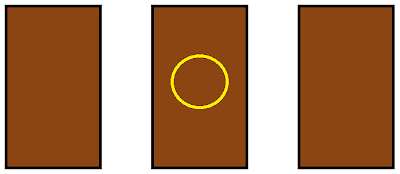
You now randomly choose the door which you think has the prize behind it, but the door doesn't open for the time being. In this case, we are going to choose the middle door.


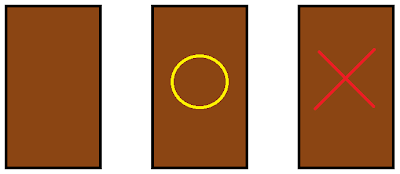
The game show host must now open one of the two remaining doors, and the door he chooses must not be the winning door. For this example, the game show host opens the door on the right.


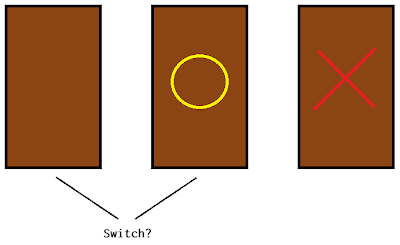
The host now asks you if you want to stick with your first choice or switch to the remaining door.


Is it to your advantage to change your choice?


To test this out, I wrote some code using JavaScript to simulate playing a number of games and supplying me with the results of how many times it won when switching or not switching the chosen door upon given the choice. The initial guesses are all random.

Results

The following is the output for 5 runs with 10,000 games each:

Playing 10000 games
Wins when not switching door 3317
Wins when switching door 6738

Playing 10000 games
Wins when not switching door 3376
Wins when switching door 6735

Playing 10000 games
Wins when not switching door 3287
Wins when switching door 6726

Playing 10000 games
Wins when not switching door 3298
Wins when switching door 6664

Playing 10000 games
Wins when not switching door 3302
Wins when switching door 6674

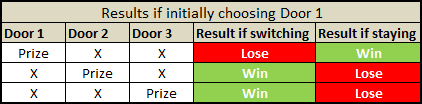
These results show how the number of times you win when switching the door is approximately double the number of times you win when not switching the door.

This may seem counter intuitive at first as you may think that there's a 1/3 chance of winning, but as you can see from the above results, that's actually not the case. In fact, switching the door wins twice as often staying.


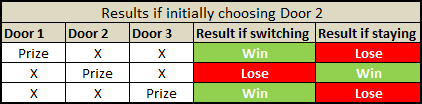
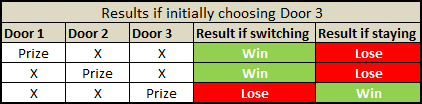
The same goes for when initially choosing Door 2 or Door 3:


Adapted from [Vos Savant, 1990]

Notice how, irrespective of which door you initially choose, you always have 2/3 chance of winning if you then switch.

The code

var totalGames = 10000,
     selectDoor = function () {
         return Math.floor(Math.random() * 3); // Choose a number from 0, 1 and 2.
     },
     games = (function () {
         var i = 0, games = [];

         for (; i < totalGames; ++i) {
             games.push(selectDoor()); // Pick a door which will hide the prize.
         }

         return games;
     }()),
     play = function (switchDoor) {
         var i = 0, j = games.length, winningDoor, randomGuess, totalTimesWon = 0;

         for (; i < j; ++i) {
             winningDoor = games[i];
             randomGuess = selectDoor();
             if ((randomGuess === winningDoor && !switchDoor) || 
                 (randomGuess !== winningDoor && switchDoor)) 
             {
                 /*
                  * If I initially guessed the winning door and didn't switch,
                  * or if I initially guessed a losing door but then switched,
                  * I've won.
                  *
                  * The only time I lose is when I initially guess the winning door 
                  * and then switch.
                  */

                 totalTimesWon++;
             }
         }
         return totalTimesWon;
     };

 /*
  * Start the simulation
  */

 console.log("Playing " + totalGames + " games");
 console.log("Wins when not switching door", play(false));
 console.log("Wins when switching door", play(true));

I've added this piece of code to the Monty Hall problem at the Rosetta Code website.

Friday, August 26, 2011

Balls to the Canvas!

To play around a bit with the canvas element, I decided to write this:


You can increase or decrease the number of balls on screen using the UP and DOWN arrows respectively.

View it in action


The source is here: https://github.com/dreasgrech/balls

Some implementation details

The background

To implement the colorful background, I'm using a cylindrical-coordinate representation of the RGB color model, known as HSV (Hue Saturation Value). Keeping the saturation and value to a constant 100 (max), I'm iterating through values 0-360 for the hue thus achieving the blending of colors. When the hue reaches 360, I reset it back to 0 and the cycle starts over.

The initial value of the hue is randomly chosen at the beginning.

Balls

All of the balls' attributes are randomly generated i.e. the initial position, size, color, speed and angle.

Since collision detection is only applied once the balls hit the edges of the browser window and the edges are axes aligned, I'm simply inverting the part of the velocity's depending to which edge is hit.

If the ball hits either the left or right edge, the x is inverted and if the ball hits the top or bottom edge, the y is inverted.

Resizing the window

I'm hooking to window.onresize so that once the browser window is resized, I adjust the width of the canvas appropriately and also remove the balls that are now out of screen.

Saturday, May 14, 2011

Solving systems of linear algebra with Wolfram Alpha

I recently needed to verify an answer to some problems I was solving at the time, and for that, I used Wolfram Alpha.

Say we want to graph the following system of equations:


The syntax would be:

solve 2x + y = 3 , x - 3y = 0

The general format would be:

solve <equation 1>, <equation 2>, ... , <equation n>

And the search engine will provide you with something like this:

Saturday, April 2, 2011

Writing brainfuck in Bitmap format

Inspired by this beautiful answer from Stack Overflow, I decided I'd do something similar.

The following is a bitmap image I drew in Paint visually showing a working brainfuck program:


Download the image, feed it to your brainfuck compiler and then execute the compiled executable.

If everything goes well, you should get something like this:

Sunday, March 27, 2011

Finding the Answer (ab)using JavaScript

This is my little tribute to Douglas Adams (and also my first go at obfuscation):


vI=0x2A;(o=eval)((r=unescape)("%5F%5f%"+vI/+(+vI+'')[1]%6+"D%36%3b"))+o(r("%"+__+"1\
%6"+(ww=String["fromCharCode"])(69)+"%73%77%65%72%3D")+((~~[]+011>>!~~~(J=Math)[""]+
(Jan=isNaN)(+/\//[+[]*+-"1"]+""[-1])*~!-+(___=__/2)+2^!+!J['round'](![H=undefined]+1
+o((J+1).substr(!+(B=alert)+-!B+7<<.9-1,!/^/.$-~255>>(2*!o('('+(F='function(')+'ema\
cs){if((dreas=vI)>emacs){always=1}}(vI-5))')-~1*1-(+!(function(){o(arguments[__['co\
nstructor'].prototype*9]+"='"+arguments[0]+"'")}('$'+__))))*2)+"Magnum/* */"[!+''+7]
+".PI")^!H*!Jan(Jan)-+2+1))<<(!0x0-[010][dreas%2]/2+(4&4)+o("'.'+o(((1|__^4*2)+\"\"\
)[1])")<<+!+(c=NaN)<<1^~+!c*-___+(+J['floor'](~2)^-4))|/**/!![,]["le"+($$$=(parseInt
+2))[2]+"g"+$$$[4]+"h"]/**/*(o("o('~1+010+/*~*/~([][0,+$6[1]+2]-always|!{a:1}[0]+24\
<<1)%15<<~!J.ceil.call.apply(J.ceil,[1..toString()])+1')")+0xE^3<<1)>>+!o('('+F+'){\
_:if(!(_=!1)){return}}())')>>!null+_));o(r(["%42",(o+'')[13],answer,(r+'')[18],ww(59
)].                                   join                                    ('')))


If the layout screwed up, here's how it should look like:


Click here to run it.

Why?


tl;dr: it was fun.

Now basically, the code does 'nothing' except alert the number 42. Actually, the majority of the code is doing a calculation to come up with the number 42, and then alert it.

Removing a single character from the above code will either invalidate the output or invalidate the code itself with a syntax error (except from that redundant whitespace on the last line)...and that was actually quite tricky to do (and may not have fully achieved since it wasn't the plan from the beginning), but was part of the fun in creating this.

I was actually writing a script that would run through my code removing a single character each time and then running (eval) the script, but I didn't finish it because as it turns out, complicating shit can be pretty fun so I switched back to this.

But the major part of the fun was finding creative ways of complicating things. Yup, complicating things! It felt refreshingly good trying to, for a change, obscure the code as much as possible given that every character is needed for the ultimate outcome.

How?


For example, let's say I had a calculation which involved the number zero. Now, the way a sane programmer would represent a zero is by using the 0 literal representation. But that's obviously too boring for a project like this, so I would try and find new ways of representing the value of zero. An example would be something like +!!NaN, or maybe -{}>>1.

Of course, there's a reason why both those obscure representations evaluate to 0 and how my above code manages to compute and alert the number 42, and one way of finding out those reasons is by painstakingly analysing the spec.

If you don't have time to carefully go through those 252 pages, what you really need to grasp is JavaScript's type coercion rules due to weak typing...and then, abuse them mercilessly!

I'm not really going to get too much into JavaScript's type system in this post, but I will briefly explain why the above two examples I mentioned evaluate to 0.

Let's take -{}>>1 first. According to JavaScript's operator precedence rules, the unary negation sign is evaluated first, thus coercing {} into the special NaN value. Then the bitwise shift coerces the NaN value into a 0 (since NaN is falsy) and 0 >> 1 is 0.

Now for +!!NaN, starting with !NaN evaluating to the boolean value true because the logical not sign coerces the NaN value to the boolean value false, and the negation (logical-not) of false is true, so !!NaN evaluates to false because double negating false evaluates to true. Finally, since the + here is used as a unary operation and not binary, it coerces false to 0; and that's it!

Splitting it up


Up until the end, I was working on a single line with no whitespace but when I was sort of ready with obfuscating, I needed to split the lines up into some shape (remotely representing something)...a task which I figured to be trivial at best. But as I came to realize, splitting the code into multiple lines without introducing errors is far from trivial.

Reason being of course that you can't just split the line in whichever point you want because naturally keywords cannot be split and other restrictions of the language syntax restrict you from splitting certain constructs directly into multiple lines.

For example, say you have function(){return}, you can't for example split in the middle of the word function:
fun
ction(){return}

That will not compile, and neither will compile if you split the return keyword; you can split at any other part of the line though.

But I actually had the most trouble splitting property calls. Say you had to split [].constructor.prototype; now that's a bitch because of the two relatively long keywords in the expression.

How did I get around this? Simple. I switched from using dot-notation to subscript-notation, and since strings can be successfully split into multiple lines, it was much easier:

[]['constructor']['prototype']

Now if we wanted to split:

[]['construc\
tor']['prototype']

To split strings into multiple lines in JavaScript, just add the backslash symbol to the end of the unterminated string literal, and now, your splitting task is much easier.

Although using the subscript-notation made the lines easier to split, it introduced a new problem.

Say I have ['ab'] and I need to split between the ' and the a characters.

You can't split like this:

['
ab']

because now you have an unterminated string, which results in an error; but you also can't do this:

['\
ab']

because although it runs successfully, you have now added an extra character (\) to the previous line and that would invalidate your box-line shape of the code. And of course, can't also do this:

[
'ab']

because, as mentioned previously, although it runs, you have now removed a character from the previous line which would invalidate the box.

This one was a bit more annoying to deal with because, to my knowledge, there is no way around it...but still, this was all part of the challenge involved and it was fun.

Saturday, February 26, 2011

Adapting to Farseer Physics Engine's Meter-Kilogram-Second (MKS) system of units

Recently switched to version 3.x of Farseer Physics Engine and have been experiencing slow simulations since? Can't get anything to accelerate past a certain point because everything looks like it's floating in a damn aquarium? Are you frustrated and tearing your hair out because you think this new version "sucks" !? Don't worry, you're not alone.

Now, take a deep breath and carry on reading...(tl;dr: demo)

Starting with 3.x, FPE now uses the MKS (Meter-Kilogram-Second) system of units and this has been the source of confusion for both people who were working with version < 3 and also people who were new to FPE.

Note: Other people have already written about this topic but I feel that, since this has been a major source of confusion for many, it hasn't been given the attention it requires.


To begin with, let's be naive and try to create a Body like such:

float width = 200f, 
      height = 100f,
      density = 10f;
Vector2 position = new Vector2(300, 400);

Body body = BodyFactory.CreateRectangle(world, width, height, density, position);

In the Draw method, I (naively) draw the texture at the body's position as follows:

spriteBatch.Draw(texture, body.Position, Color.White);

What I'm doing above (or what at least I think I'm doing) is create a 200x100 pixel rectangular body positioned at (200, 300) pixels on the screen and then drawing it at wherever the body is at the current moment, starting from our initial (300, 400).

But because now Farseer Physics Engine uses the MKS system of units, what we are actually doing is creating a 200m wide and a 100m high rectangle rectangle positioned 200 meters from the right and 100 meters from the top! And Box2D (since Farseer is based on Box2D) tells us that we should keep our bodies (especially if they move) in the 0.1 - 10 meter range.

This means that we now have to split the way we position physics objects on screen and the way we draw their corresponding textures.


To accomplish this, we can use the ConvertUnits class found under Samples\Samples XNA\Samples XNA\ScreenSystem.

ConvertUnits is a helper class that lets us switch between display units (pixels) and simulation units (MKS) easily.

So let's go back to that previous example and fix our code by first converting our display units to simulation units with ConvertUnits.ToSimUnits:

float width = ConvertUnits.ToSimUnits(200f), 
      height = ConvertUnits.ToSimUnits(100f),
      density = 10f;
Vector2 position = ConvertUnits.ToSimUnits(300, 400); // ToSimUnits has an overload which returns a vector given two floats.

Body body = BodyFactory.CreateRectangle(world, width, height, density, position);

Now to draw our body on screen, we need to convert the simulation units back to display units by the appropriately named method ConvertUnits.ToDisplayUnits:

spriteBatch.Draw(texture, ConvertUnits.ToDisplayUnits(body.Position), Color.White);


Still can't get it? No worries, because I created the simplest Farseer Physics 3 example you can find which demonstrates what I said above: https://github.com/dreasgrech/SimplestFarseerPhysics3Example

The example creates a rectangle and lets gravity do its part; that's it! I've compiled it for both the Windows and the Windows Phone 7 XNA versions.

Another note: Since FPE is currently undergoing the upgrade to 3.3, the above code example can break if used with a different version of the engine. I've compiled the example with the version from Changeset #85352.