Saturday, April 10, 2010

Using the singlespace environment in an lstnewenvironment, in LaTeX

I was working on a LaTeX document and I had \linespread{1.6} set for double line spacing. But then I added some code snippets to the document with the listings package and I wanted my code to have single line spacing, rather than double line spacing. So, I tried putting them both in a new listings environment to abstract them into a single environment:

\lstnewenvironment{javacode}[2]
{
\begin{singlespace}
\lstset{language=java, label=#1, caption=#2}}
{
\end{singlespace}
}

But upon compiling, I was getting the following 'error':

Overfull \hbox (6.0pt too wide) in paragraph at lines 6--6
[][][][][][][] 
[1]) [2] [3])
*

The Fix

Upon some research, I found the following question which provided a solution to my problem.

The solution to the singlespace environment problem, as suggested by that answer, is to not use the singlespace environment but instead to use \singlespacing instead.

Therefore, this is my final working code:

\lstnewenvironment{javacode}[2]
{
\singlespacing
\lstset{language=java, label=#1, caption=#2}}
{}

Thursday, April 8, 2010

Removing the vim error: viminfo: Illegal starting char in line

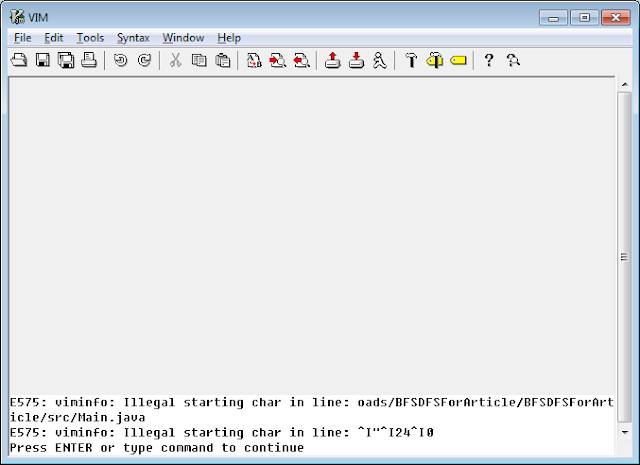
Last time, I tried opening my gVim and got the following error:


E575: viminfo: Illegal starting char in line: oads/BFSDFSForArticle/BFSDFSForArticle/src/Main.java
E575: viminfo: Illegal starting char in line: ^I"^I24^I0

After some digging around, I realized that this problem is because for some apparent reason, my viminfo file got corrupted.

This viminfo file is mostly used for temporary working data and does not contain any settings, and thus it is safe to delete it. So that's what I intended to do, but finding it was another story.

After I searched my vim installation directory without being able to find this file, I decided to completely uninstall vim and install it from scratch again. But, much to my surprise, the error was still there when I ran vim after the new installation! Which obviously means that the viminfo file was not located in my vim installation directory.

I then ran gVim with the Verbose option, -V. This option instructs vim to tell you everything that its doing, and it is controlled by levels. You can specify the level via -Vn, where n is the level of data that you want to see. By default, if you run -V, the level is 10 (-V10).

For the purposes of actually locating the viminfo file, level 1 is sufficient:

C:\Program Files\Vim\vim72>gvim -V1

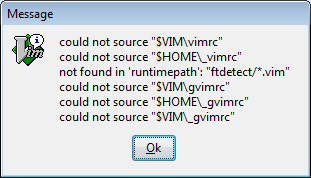
This prompted the following message box:


This gave me the information I was looking for. As you can see, the folders I am looking for are $HOME and $VIM. These are environment variables, and to actually see what paths they are mapped to, open vim and run the following commands:

:echo $HOME
:echo $VIM

Those two commands will show you the paths that the variables are mapped to. In my case, $HOME pointed to C:\Users\Andreas and $VIM pointed to C:\Program Files\Vim.

Now since I had uninstalled vim earlier on (thus completely removing C:\Program Files\Vim), the folder I checked for the file was C:\Users\Andreas.

I navigated to the folder and voila, there was the file I was searching for: _viminfo. I deleted that file, and the error was gone.

Wednesday, April 7, 2010

Disallowing access to files in an ASP.NET website with HttpForbiddenHandler

Disallowing access to files in ASP.NET is a very easy task to accomplish.

In this example, I will disallow access to the file called private.txt that is situated at the root of the website.

When I access this file normally, I get the following:


To disallow access to the file, use the Error Generator Handler HttpForbiddenHandler. This generates a 403 Forbidden error when the user tries to access that file.

To use the handler, simply add it to your <httpHandlers> section in the web.config:

<httpHandlers>
    <add verb="*" path="private.txt" type="System.Web.HttpForbiddenHandler"/>
</httpHandlers>

This is what the user will not get when he tries to access the file:


The HttpForbiddenHandler can also be used to disallow access to multiple or even folders.

In the following example, I will be disallowing access to all the files that have the .private extension:

<httpHandlers>
    <add verb="*" path="*.private" type="System.Web.HttpForbiddenHandler"/>
</httpHandlers>

Saturday, April 3, 2010

"Object reference not set to an instance of an object" when using HttpContext.Current.Cache in an ASP.NET Custom Web Server Control

Recently I was developing a custom ASP.NET Web Server Control, and I was making use of the Cache to read data only once, and not after every PostBack.

But when I then tried to view the Control in the Design View of an ASP.NET page, I got the following:


I then traced the problem to the following Property I had in my Control:

public IEnumerable<provider> Providers
{
    get
    {
        if (HttpContext.Current.Cache[ProjectSettings.CacheKey] == null) //This line was throwing the exception
        {
            return null;
        }
        return (IEnumerable<provider>)HttpContext.Current.Cache[ProjectSettings.CacheKey];
    }
}

The Object reference not set to an instance of an object exception was being thrown because I was trying to access a key from the Cache when the Cache was null. This is because when the website is not running, the HttpContext.Current will not be available and thus be set to null.

Fixing the problem


Therefore, to cater for this problem with the Design View rendering, I made use of such a "hack":

public IEnumerable<provider> Providers
{
    get
    {
        /*
         * Begin Hack:  The following [if (HttpContext.Current == null)] is used because 
         *              of the Visual Studio Designer, to supress the 
         *              "Object reference not set to an instance of an object" error
         *              that is displayed in the Design View
         *              - Dreas Grech.
         * */
        if (HttpContext.Current == null)
        {
            return new List<provider>();
        }
        /*
         * End Hack.
         * */

        if (HttpContext.Current.Cache[ProjectSettings.CacheKey] == null)
        {
            return null;
        }
        return (IEnumerable<provider>)HttpContext.Current.Cache[ProjectSettings.CacheKey];
    }
}

As you can see from the above code, I added a condition that checks if the HttpContext.Current is null and if it is, just returns a new List<provider>:

if (HttpContext.Current == null)
{
    return new List<provider>();
}

Thursday, April 1, 2010

Removing the default span from a Custom Web Server Control

If you have ever developed a custom Web Server Control for ASP.NET, you may have realized that the Web Server Control automatically encapsulates your control inside a span tag:


This is because the WebControl's constructor sets HtmlTextWriterTag.Span as the default begin tag:

protected WebControl() : this(HtmlTextWriterTag.Span) { 

}

Fixing the issue

To fix this, all you need to do is override the Render method in your Control class , as follows:

protected override void Render(HtmlTextWriter writer)
{
    RenderContents(writer);
}

That way, you will be suppressing the outer span tag from being rendered.

Further Explanation

The following is the implementation of the Render method inside the WebControl class:

protected internal override void Render(HtmlTextWriter writer)
{
    this.RenderBeginTag(writer);
    this.RenderContents(writer);
    this.RenderEndTag(writer);
}

As you can see, it's calling the RenderBeginTag method of the same WebControl class:

public virtual void RenderBeginTag(HtmlTextWriter writer)
{
    this.AddAttributesToRender(writer);
    HtmlTextWriterTag tagKey = this.TagKey;
    if (tagKey != HtmlTextWriterTag.Unknown)
    {
        writer.RenderBeginTag(tagKey);
    }
    else
    {
        writer.RenderBeginTag(this.TagName);
    }
}

The RenderBeginTag is rendering tagKey, which is set in the constructor we saw earlier on:

private HtmlTextWriterTag tagKey;

protected WebControl() : this(HtmlTextWriterTag.Span) { }
public WebControl(HtmlTextWriterTag tag)
{
    this.tagKey = tag;
}

Therefore, by overriding the Render method in our WebControl subclass to only call the RenderContents method, we will be bypassing the following methods that render the span tag: RenderBeginTag and RenderEndTag.

protected override void Render(HtmlTextWriter writer)
{
    RenderContents(writer);

    /* instead of: 

    Render(HtmlTextWriter writer)
    {
        this.RenderBeginTag(writer);
        this.RenderContents(writer);
        this.RenderEndTag(writer);
    }

     */
}

Wednesday, March 31, 2010

Transferring files with netcat


Netcat is a computer networking service for reading from and writing network connections using TCP or UDP. Netcat is designed to be a dependable “back-end” device that can be used candidly or easily driven by other programs and scripts.


netcat is an application that is mostly used for "backdoor" purposes, and in this tutorial, I will show you how to transfer a file over a network via netcat.

If you're using Windows, you can download netcat from here. Once it is downloaded, copy nc.exe to C:\Windows\System32 so that you can access it from everywhere.

Transferring files


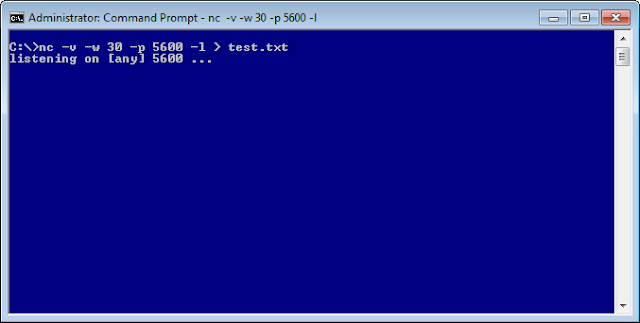
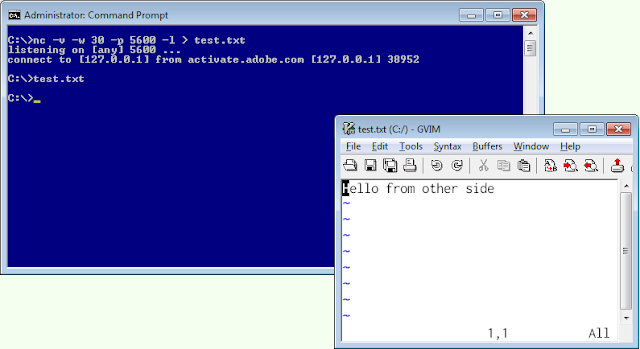
First run the following command on the receiving computer:

nc -v -w 30 -p 5600 -l > test.txt


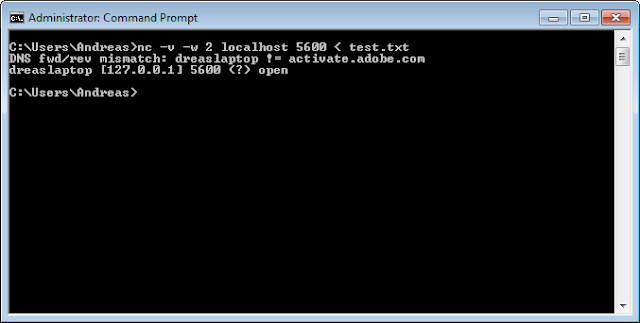
After the receiving computer starts listening (in this case, on port 5600), run the following command on the sending computer:

nc -v -w 2 10.0.0.1 5600 < test.txt

where 10.0.0.1 is the address of the receiving computer. In this case, it's localhost because I'm transferring files over the same computer, for demonstration purposes.


The file was now transferred to the other side:

Sunday, March 7, 2010

Java's Iterators and Iterables

What is an Iterator?

From Wikipedia:


In computer science, an iterator is an object that allows a programmer to traverse through all the elements of a collection, regardless of its specific implementation.


The point of using an iterator is to allow the the client to iterate over the collection of objects, without exposing implementation details. This gives you the benefit to change what collection the Iterator iterates over and how each element is served, without making any change the client's code.

Making custom collections iterable

Let's say we have our own custom Vector-based collection, GameCollection, that stores Games and we want to make this collection iterable (over its stored Games) by making it implement the Iterator inteface:

public class GameCollection implements Iterable<Game> {
 private Vector<Game> games;
 
 public GameCollection() {
  games = new Vector<Game>();
 }
 
 public void add(Game game) {
  games.add(game);
 }

 @Override
 public Iterator<Game> iterator() {
  return games.iterator();
 }
}

The client can then use the above collection as follows:

GameCollection gc = new GameCollection();
Iterator<game> gameIterator = gc.iterator();

while (gameIterator.hasNext()) {
 Game g = gameIterator.next();
 System.out.println(g.getName());
}

Or better yet, make use of Java's for-each statement:

GameCollection gc = new GameCollection();
for (Game g : gc) {
 System.out.println(g.getName());
}

As you can see from the above code, the client doesn't know that we are using a Vector to store our Games in the GameCollection. Infact, we can later change the GameCollection to store the Games in a LinkedList or an Array, and yet the client wouldn't need to change his iteration code (code above) to suit for our changes.

Multiple iterators for a custom collection

What if we now want our GameCollection to offer two iterable solutions? Say we want our GameCollection to iterate over both Games and also GameConsoles?

The first thing that comes to mind is to try and make the GameCollection implement two Iterator interfaces using different generic arguments:

public class GameCollection implements Iterable<Game>, Iterable<GameConsole>

but unfortunately, the above doesn't compile. Therefore, as a workaround to such an issue, we can make use of Java's ability to allow for inner classes:

public class GameCollection  {
 private Vector<Game> games;
 private Vector<GameConsole> consoles;
 
 private class Games implements Iterable<Game> {
  @Override
  public Iterator<Game> iterator() {
   return games.iterator();
  }
 }
 
 private class Consoles implements Iterable<GameConsole> {
  @Override
  public Iterator<GameConsole> iterator() {
   return consoles.iterator();
  }
  
 }
 
 public GameCollection() {
  games = new Vector<Game>();
  consoles = new Vector<GameConsole>();
 }
 
 public void add(Game game) {
  games.add(game);
 }
 
 public void add(GameConsole console) {
  consoles.add(console);
 }

 public Games games() {
  return new Games();
 }
 
 public Consoles consoles() {
  return new Consoles();
 }
}

With the above two inner classes and the public methods games() and consoles(), the client can iterate over the collections like such:

GameCollection gc = new GameCollection();

//Add games and consoles with gc.add()

for (Game g : gc.games()) {
 System.out.println(g.getName());
}

for (GameConsole g : gc.consoles()) {
 System.out.println(g.getName());
}

Creating custom iterators

Up till this point, we have only used iterators that are in built with Java's existing collections; but what if we want our own custom iterator? We can use Java's java.util.Iterator interface to build our own iterator.

In the following example, I have created a Circular Iterator:

public class CircularGamesIterator implements Iterator<Game> {

 private Vector<Game> list;
 private int currentPosition;
 
 public CircularGamesIterator(Vector<Game> games) {
  list = games;
  currentPosition = 0;
 }
 
 @Override
 public boolean hasNext() {
  return currentPosition < list.size();
 }

 @Override
 public Game next() {
  Game el = list.elementAt(currentPosition);
  currentPosition = (currentPosition + 1) % list.size(); 
  return el;
 }

 @Override
 public void remove() { }
}

The iterator() method of the GameCollection class can then be modified to return an instance of the CircularGamesIterator:

public class GameCollection implements Iterable<Game> {
 private Vector<Game> games;
 
 public GameCollection() {
  games = new Vector<Game>();
 }
 
 public void add(Game game) {
  games.add(game);
 }

 @Override
 public Iterator<Game> iterator() {
  return new CircularGamesIterator(games);
 }
}

An Iterator should not be Iterable!

I have seen some examples on the internet where people make Iterators iterable by making their Iterators implement the Iterator interface and returning this in the iterator() method:
I have removed the implementation in the methods for the following code for brevity.

public class CustomIterator implements Iterator<Game>, Iterable<Game> {

 public CustomIterator(Vector<Game> games) {
  list = games;
 }

 @Override
 public Iterator<Game> iterator() {
  return this;
 }

 @Override
 public boolean hasNext() {
   //Implementation
 }

 @Override
 public Game next() {
   //Implementation
 }

 @Override
 public void remove() { }
}

The problem with the above code can be clearly illustrated with such a method:

public static void iterateTwice(Iterable<Game> games) {
 for (Game g : games) {
  System.out.println(g.getName());
 }
 
 for (Game g : games) {
  System.out.println(g.getName());
 }
 System.out.println();
}

If you directly pass in your iterable iterator to the above method, the Games will only be printed once.

To illustrate this, let's assume that we will use the custom iterator mentioned above, CustomIterator, that implements both Iterator<Game> and Iterable<Game>. Our GameCollection implements Iterable<Game>, and its iterator() method returns new CustomIterator(games);. Now, let's also say that GameCollection also provides a method games() that also returns new CustomIterator(games);.

Here's an example that illustrates this:
GameCollection gc = new GameCollection();

gc.add(new Game("Broken Sword"));
gc.add(new Game("Grim Fandango"));
gc.add(new Game("Maniac Mansion"));

System.out.println("Printing the iterable collection, GameCollection");
iterateTwice(gc);

System.out.println("Printing the iterable iterator, CustomIterator");
CustomIterator gamesIterator = gc.games();
iterateTwice(gamesIterator);

The output of the above code is as follows:
Printing the iterable collection, GameCollection
Broken Sword
Grim Fandango
Maniac Mansion
Broken Sword
Grim Fandango
Maniac  Mansion

Printing the iterable iterator, CustomIterator
Broken Sword
Grim Fandango
Maniac Mansion

Notice how when passing the iterable CustomIterator iterator to the method, the Games were only printed once, whereas when we passed in the GameCollection that implements Iterable, the Games were printed twice.

This is because when CustomIterator was passed in, the second for loop terminated immediately.