
To check my answers when calculating the inverse of functions, I've found this handy widget from Wolfram|Alpha which does the job:
Sunday, October 9, 2011


Wednesday, October 5, 2011
A Function Transformations reference sheet
Since I never miss a change to procrastinate, I decided to spend some time compiling a "cheat sheet" for function transformations.
I've included the following 8 transformations:
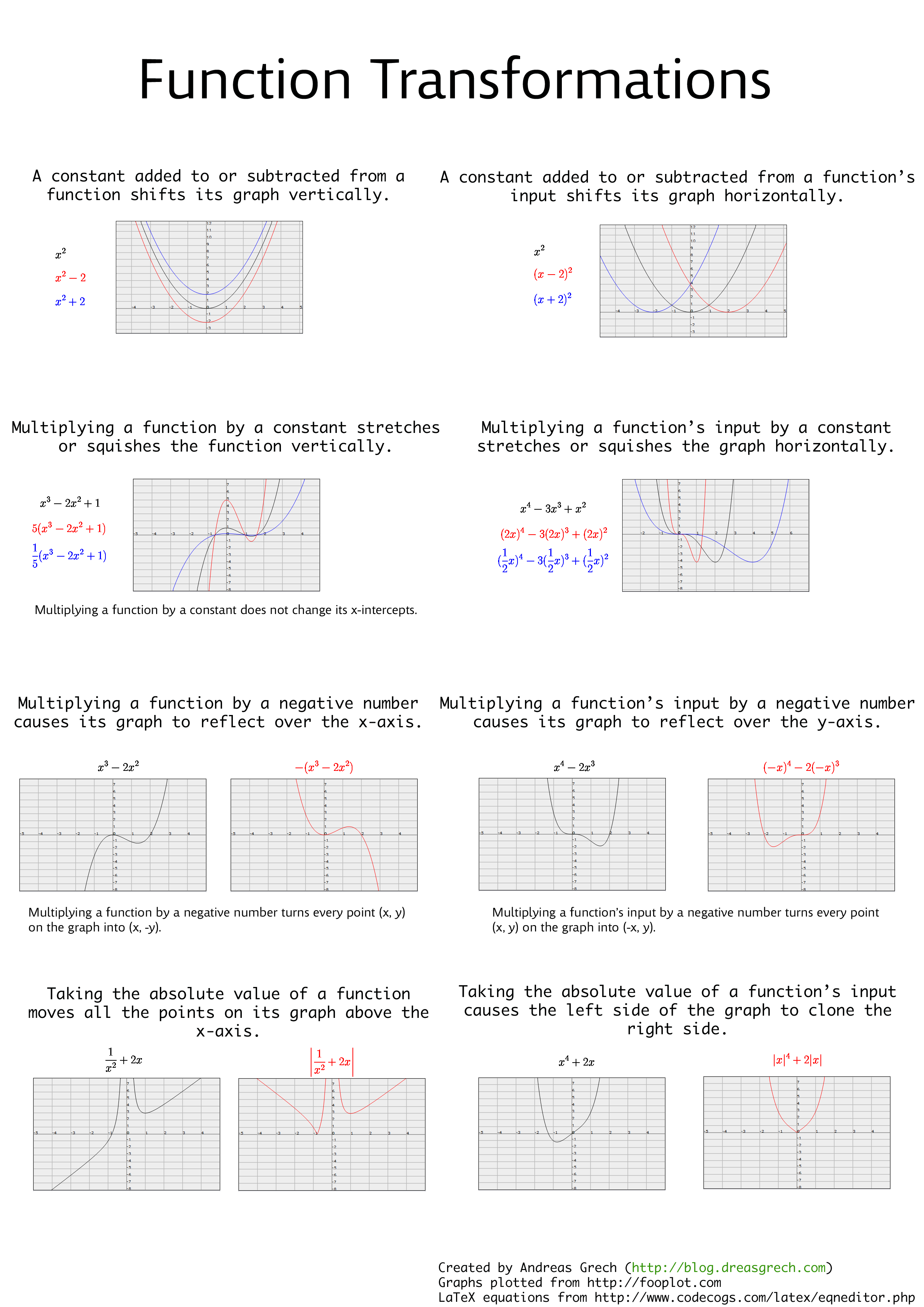
I've included the following 8 transformations:
- A constant added to or subtracted from a function shifts its graph vertically.
- A constant added to or subtracted from a function's input shifts its graph horizontally.
- Multiplying a function by a constant stretches or squishes the function vertically.
- Multiplying a function's input by a constant stretches or squishes the function horizontally.
- Multiplying a function by a negative number causes its graph to reflect over the x-axis.
- Multiplying a function's input by a negative number causes its graph to reflect over the y-axis.
- Taking the absolute value of a function moves all the points on its graph above the x-axis.
- Taking the absolute value of a function's input causes the left side of the graph to clone the right side.
Sunday, October 2, 2011
A State Manager in JavaScript
The following is an implementation for a state manager written in JavaScript. More than one state can be "on" at one moment but mutual exclusivity rules can be set up to allow certain states to not be "on" at the same time i.e. if one of the states is switched on while the other is already on, the latter will be switched off since they can't be both on at the same time.
It also supports two hooks which can be used if you want to be notified when states are changed.
It's implemented with a fluent interface to allow for method-chaining.
The source is here: https://github.com/dreasgrech/statemanager-js
I've set up a simple demo to show how it can be used. You can view it here: http://dreasgrech.com/upload/statemanager-js/demo.html

It also supports two hooks which can be used if you want to be notified when states are changed.
It's implemented with a fluent interface to allow for method-chaining.
The source is here: https://github.com/dreasgrech/statemanager-js
I've set up a simple demo to show how it can be used. You can view it here: http://dreasgrech.com/upload/statemanager-js/demo.html
Basic Usage
var state = stateManager();
state.turnOn("state 1", "state 2");

state.on("state 1"); // true
state.on("state 2"); // true
state.on("state 3"); // false

state.toggle("state 2"); // "state 2" is now off
state.on("state 2"); // false
toggle returns the new state after it's been toggled.Mutual Exclusivity
var state = stateManager();

state.mutex("state 1", "state 3"); // "state 1" and "state 2" now cannot be both on at the same time
state.mutex("state 2", "state 3"); // "state 2" and "state 3" now cannot be both on at the same time

state.turnOn("state 1");
state.turnOn("state 3"); // "state 1" will now be turned off since 1 and 3 are mutually exclusive
state.turnOn("state 1"); // turning "state 1" on, but switching "state 3" off for the same reason
state.turnOn("state 2"); // if "state 3" was on at this point, it would have been switched off
Hooks
var state = stateManager();

state.onStateChanged(function (state, value) { // The global event; fires every time a state changes
  console.log(state + " is now " + value);
});

state.onStateChanged("state 1", function (value) { // The event that will only fire when "state 1" changes
  console.log("[Custom hook] state 1 has been changed.  New value: " + value);
});

state.turnOn("state 1");
state.turnOn("state 3", "state 2");
state.toggle("state 1");
state.turnOn("state 2");
Output:state 1 is now 1 [Custom hook] state 1 has been changed. New value: 1 state 3 is now 1 state 2 is now 1 state 1 is now 0 [Custom hook] state 1 has been changed. New value: 0Note that the onStateChanged event fires only when a state changes. For example, if you turnOn("state 2") while "state 2" is already on, the event will not fire. The same goes for when a state is off and you try to turnOff.
Saturday, October 1, 2011
Function composition in JavaScript
Function composition is the application of a result of a function as input to another function. Say we have the following three functions:
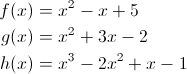
Composing functions f, g and h respectively means that we pass the output from function h as the input to function g and then passing the output from g as the input to function f. Mathematically, it would be represented as follows:

That's essentially the same as:

Functions in JavaScript are first class citizens. This means that they can be stored in variables and data structures, passed as an argument to functions and also returned from functions. This means that we can easily implement function composition in JavaScript with a very trivial function:
Here's an example of how we can use it by composing three functions that represent the three polynomials mentioned at the start of the post:
Composing them together would then be:
The result of the composed function is now the same as the result of f(g(h(x))):
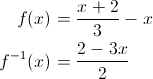
If we had a function f and its inverse f-1 and we compose them, we should get the original input x:

Composing functions f, g and h respectively means that we pass the output from function h as the input to function g and then passing the output from g as the input to function f. Mathematically, it would be represented as follows:
That's essentially the same as:
Functions in JavaScript are first class citizens. This means that they can be stored in variables and data structures, passed as an argument to functions and also returned from functions. This means that we can easily implement function composition in JavaScript with a very trivial function:
Function.prototype.compose || (Function.prototype.compose = function (f) {
    var g = this;
    return function () {
        return g(f.apply(null, arguments));
    };
});
Here's an example of how we can use it by composing three functions that represent the three polynomials mentioned at the start of the post:
var f = function (x) {
    return x*x - x + 5;
}, g = function (x) {
    return x*x + 3*x - 2;
}, h = function (x) {
    return x*x*x - 2*(x*x) + x -1;
};
Composing them together would then be:
var composed = f.compose(g).compose(h);
The result of the composed function is now the same as the result of f(g(h(x))):
composed(x) === f(g(h(x))); // true
If we had a function f and its inverse f-1 and we compose them, we should get the original input x:
var f = function (x) {
    return (x + 2) / 3 - x;
}, f_inverse = function (x) {
    return (2 - 3*x) / 2;
};

(f.compose(f_inverse)(x) || f_inverse.compose(f)(x) || x) === x;  // true
Thursday, September 29, 2011
JavaScript helpers: Iterating an array while skipping select elements
Array.prototype.iterate || (Array.prototype.iterate = function (callback, ignore) {
  var i = 0, j = this.length;
    for (; i < j; ++i) {
        if (ignore && ignore(this[i], i)) {
          continue;
        }

        callback(this[i], i);
    }
});
Usage
Here's how we can use it to iterate over a couple of numbers, skipping over the even ones:
var arr = [1, 2, 3, 4, 5, 6, 7, 8, 9, 10];

arr.iterate(function (el) {
  console.log(el);
}, function (el) {
  return !(el % 2);
});
Output:
1
3
5
7
9
Here's another example, this time involving objects:
var queen = function (reference) {
    return {
        ref: reference
    };
}, arr = [queen("Aragon"), queen("Boleyn"), queen("Seymour"), queen("Cleves"), queen("Howard"), queen("Parr")];

arr.iterate(function (el, i) {
  console.log(i, el.ref);
}, function (q) {
  return q.ref === "Boleyn"  || q.ref === "Howard";
});
Output (the queens who died with their heads on):0 Aragon 2 Seymour 3 Cleves 5 Parr
If no ignore function is passed as the second parameter of the iterate method, no elements are skipped:
var arr = ["Mr. Albert Show", "Fusion Orchestra", "Fuzzy Duck", "Minotaurus"];

arr.iterate(function (el, i) {
  console.log(el);
});
OutputMr. Albert Show Fusion Orchestra Fuzzy Duck Minotaurus
Saturday, September 17, 2011
Finding a YouTube video title by scraping
I was recently writing a tool in C# and I needed a way to get a YouTube video title. I could have used the YouTube API but I wasn't bothered about setting everything up and going through the documentation, so I decided to scrape the title off the video page itself.
For this, I first wrote a very simple way to execute a GET request and return the response (Removed all forms of error checking for brevity):
For this, I first wrote a very simple way to execute a GET request and return the response (Removed all forms of error checking for brevity):
public static string ExecuteGETRequest(string url)
{
    var request = (HttpWebRequest)WebRequest.Create(url);

    using (var response = (HttpWebResponse)request.GetResponse())
    {
        var reader = new StreamReader(response.GetResponseStream());

        return reader.ReadToEnd();
    }
}
And here's the method that does the task at hand:public static string GetYouTubeVideoTitle(string youtubeLinkUrl)
{
string response = ExecuteGETRequest(youtubeLinkUrl),
title = response.Substring(response.IndexOf("<title>\n") + 8);
title = title.Substring(0, title.IndexOf("\n"));
return title.Trim();
}
Usage
var title = GetYouTubeVideoTitle("http://www.youtube.com/watch?v=TY9jN6hm3N0"); // "Wicked Lady - Ship of Ghosts (Part 1 of 2) 1972"
Be wary of using this method for extracting titles because it could potentially break in the future due to changes in how YouTube renders the page with HTML; but it may be useful for quick scripts.Checking for link validity
If you want to make sure the given link actually points to a YouTube video, you can use something like this:public static bool IsValidYoutubeLink(string youtubeLink)
{
// Regular expression from http://www.regexlib.com/REDetails.aspx?regexp_id=2569
return Regex.IsMatch(youtubeLink, @"^http://\w{0,3}.?youtube+\.\w{2,3}/watch\?v=[\w-]{11}");
}
Sunday, September 11, 2011
Generating a list of links for a user's YouTube uploads
This is a very simple application I just wrote to generate a list of all of the video upload links given a YouTube user.
Download the exe (release) file from: http://dreasgrech.com/upload/youtubeuseruploads/YouTubeUserUploads.exe
And the source: http://dreasgrech.com/upload/youtubeuseruploads/YouTubeUserUploads-source.zip
It won't be the best code you'll ever see, but it does the job for the task at hand.
YouTubeUserUploads.exe <username> [file]
If [file] is not given, a file links.txt will be created in the current directory.
That would create (or overwrite) a text file called links.txt and write the links to my three currently uploaded videos at the time of writing:
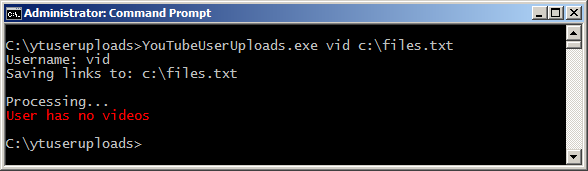
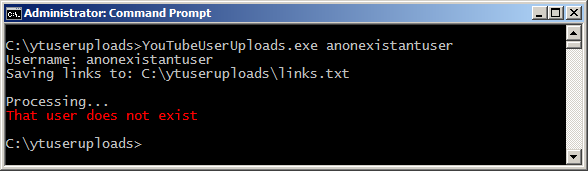
Download
Since this was such a small project, I didn't see fit to have a github repository for it so I just uploaded it to my hosting server.Download the exe (release) file from: http://dreasgrech.com/upload/youtubeuseruploads/YouTubeUserUploads.exe
And the source: http://dreasgrech.com/upload/youtubeuseruploads/YouTubeUserUploads-source.zip
It won't be the best code you'll ever see, but it does the job for the task at hand.
Usage
If [file] is not given, a file links.txt will be created in the current directory.
Demo
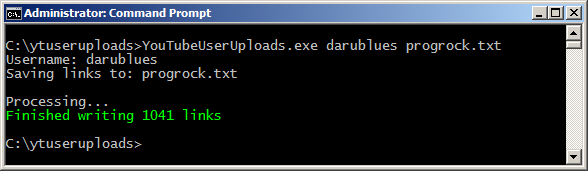
Here's an example run using my YouTube username:C:\YouTubeUserUploads.exe agnt666 uploads.txt Username: agnt666 Saving links to: uploads.txt Processing... Finished writing 3 links
That would create (or overwrite) a text file called links.txt and write the links to my three currently uploaded videos at the time of writing:
http://www.youtube.com/watch?v=rsXnEpWyeEg
http://www.youtube.com/watch?v=sxBiD7u7nx8
http://www.youtube.com/watch?v=Ri2SHGZaSqs
Screenshots
Subscribe to:
Posts (Atom)


